

Participant Web Demo Account Login Instructions
- To access the Participant Web Demo account, visit BPAS University https://u.bpas.com. Click the Account Login menu, then select Retirement Plan and Login to Your Account.
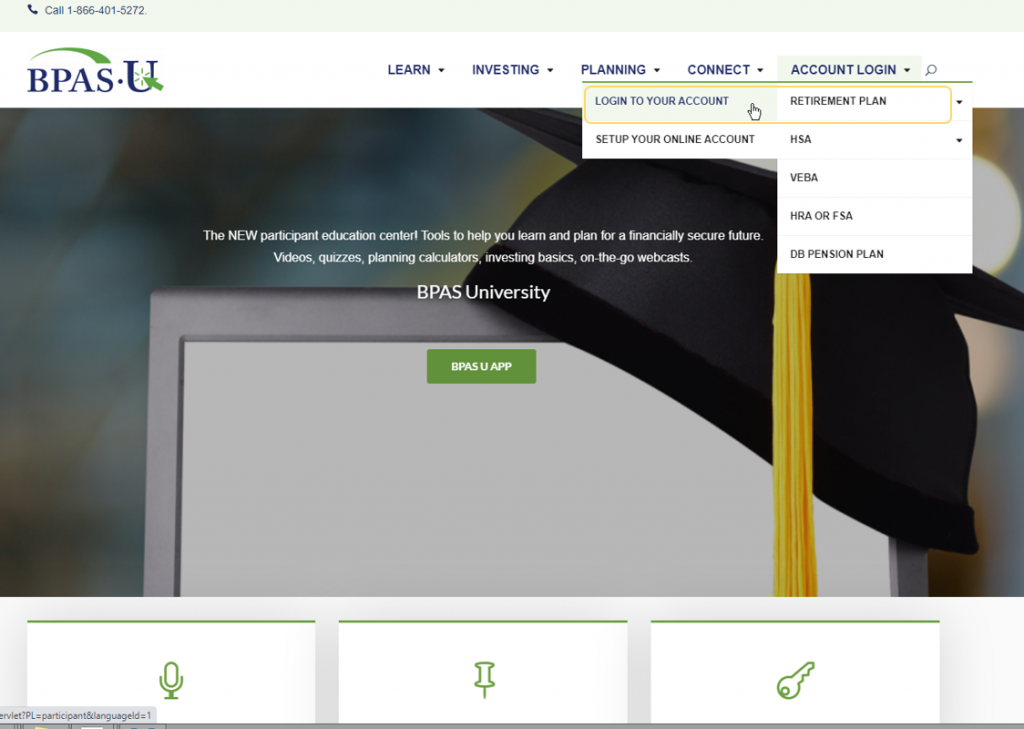
- Enter the following credentials to login to the Participant Demo Account. If the credentials do not work, or the account appears locked, please inform your BPAS sales representative, or send an email to [email protected].
Active Participant:
Username: EEverett01
Password: Can be a combination of any letters or numbers
Terminated Participant:
Username: ONDees01
Password: Can be a combination of any letters or numbers
Plan Sponsor and Financial Intermediary Portal
Web Demo Account Login Instructions

- To access the Web Demo account, visit BPAS https://bpas.com. Click the Login button, then select Partner Login.
- Enter the following credentials to login to the Participant Demo Account. If the credentials do not work, or the account appears locked, please inform your BPAS sales representative, or send an email to [email protected].
Demo Account:
Username: BPASPlandemo
Password: PortaldemoPW16*